
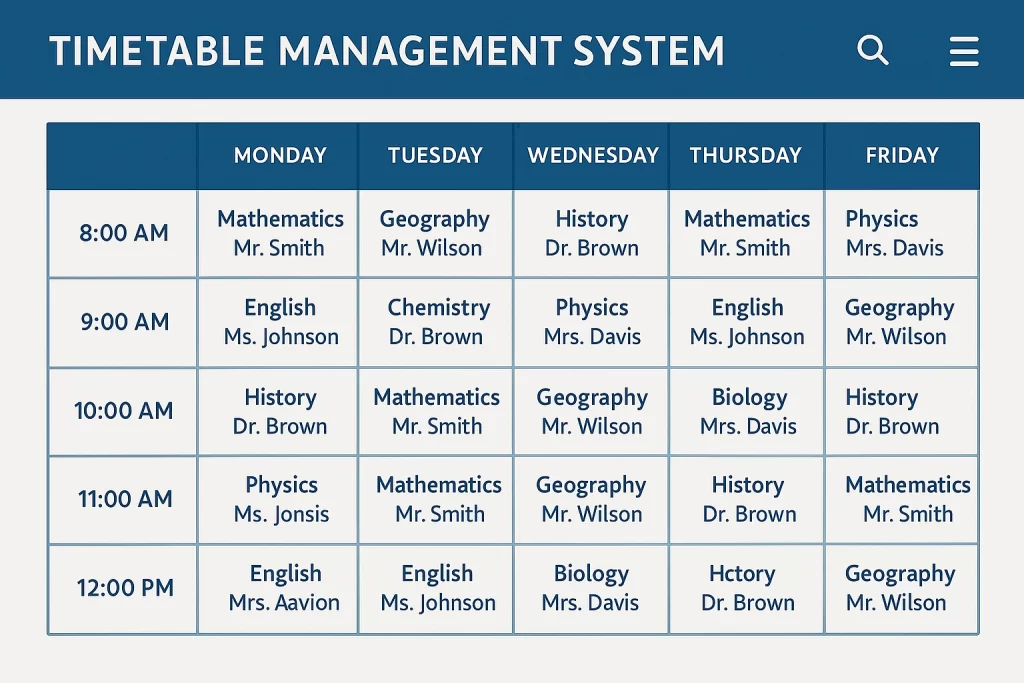
Are you still losing dozens of precious administrative hours every term trying to solve the impossible puzzle of manual scheduling? In many Pakistani schools, the start of a new semester is marked by exhausted vice-principals huddled over charts, trying to ensure that no teacher is assigned to two places at once. Statistics suggest that manual scheduling for a mid-sized school can take up to 40 man-hours per term, with a 15% margin for error regarding room or teacher conflicts. This guide explores how you can use modern technology to automate school timetables, shifting from manual frustration to a seamless digital click. You will discover the mechanics of timetable automation, the specific benefits for the local educational landscape, and actionable steps to implement a school scheduling system that actually works.
Why is it time to automate school timetables in your institution?
The primary reason to automate school timetables is the elimination of human error and the radical reclamation of time. In a traditional setting, a single change—such as a teacher going on maternity leave or a lab undergoing renovation—can trigger a domino effect that ruins the entire week’s schedule. An ERP timetable module handles these variables instantly. It acts like a high-powered calculator that considers thousands of permutations in seconds, ensuring that every constraint is met without overlap.
I once worked with a private school in Rawalpindi that struggled with “ghost periods” where students were left without teachers because of scheduling overlaps. By moving to an automated system, they didn’t just fix the errors; they optimized teacher workloads. The system ensured that no teacher had more than three consecutive high-energy lectures, significantly reducing staff burnout. In the context of 2026, where Pakistani schools are competing on the quality of their administrative excellence as much as their academics, having a flawless, conflict-free schedule is a baseline requirement for professional credibility.
How does a school scheduling system handle complex constraints?
One of the most frequent questions I hear from administrators is: “Can a machine really understand our specific needs?” The answer lies in the sophisticated algorithms used in modern timetable automation. You don’t just “hit a button”; you input your specific “rules” or constraints. These include teacher availability, subject priority, room capacity, and even the maximum number of heavy subjects like Physics or Math that a student should have in a single day.
For example, a school in Karachi utilized an ERP timetable to manage their shared laboratory spaces across O-Level and Matric streams. The system was programmed to prioritize lab sessions in the morning when student energy is highest, while ensuring that the lab’s capacity was never exceeded. This type of intelligent resource allocation is nearly impossible to do manually without errors. Modern systems also allow for “what-if” scenarios. If you are considering adding a new elective next year, you can run a simulation to see how it would impact your current teacher-student ratio and classroom availability before you even hire a new staff member.
What are the tangible benefits of ERP timetable integration?
The real power of an ERP timetable is that it doesn’t live in a vacuum. Because it is integrated with the rest of your school management software, the data flows seamlessly to where it is needed most. When you automate school timetables, the resulting schedule is instantly pushed to the teacher’s mobile app, the student’s portal, and even the digital signage in your school corridors. There is no need for printing and pinning hundreds of paper sheets that become obsolete the moment a substitution is made.
Consider the “Substitution Management” feature. In a manual system, if a teacher calls in sick at 7:00 AM, the coordinator has to scramble to find a free teacher who is qualified to cover that specific subject. An integrated school scheduling system identifies the best available substitute based on their current workload and subject expertise, and sends them a notification instantly. A study from a regional EdTech provider in 2025 noted that schools using automated substitution reduced “unsupervised classes” by nearly 80%. This level of agility is what separates a modern institution from an outdated one.
Actionable Implementation Steps:
-
Audit your constraints: Before setting up the software, list every “rule” your school follows (e.g., “Mr. Ali cannot teach on Fridays” or “Grade 10 needs the Bio Lab on Tuesdays”).
-
Clean your data: Ensure all teacher names, classroom numbers, and subject codes are standardized in your ERP.
-
Start with a pilot: Run the automated system alongside your manual one for a two-week period to verify accuracy before going fully digital.
Can local schools in Pakistan afford this level of automation?
A common misconception is that the ability to automate school timetables is reserved for elite, high-fee institutions. However, in 2026, the landscape of software as a service (SaaS) in Pakistan has made these tools incredibly accessible. Many local ERP providers offer modular pricing, meaning you can pay specifically for the timetable automation module without buying the entire suite if your budget is tight.
I recently consulted for a community school in a suburban area of Lahore. They were hesitant about the cost until they calculated the “cost of time.” They realized they were paying their senior administrative staff for nearly a week of overtime every term just to handle scheduling. The annual cost of the ERP module was actually less than the overtime pay for a single term. This is the “hidden ROI” of school technology. By investing in a school scheduling system, you aren’t just buying software; you are buying back the mental bandwidth of your leadership team so they can focus on improving pedagogy rather than moving names around a spreadsheet.
What are the 2026 trends in school scheduling and automation?
As we move through 2026, we are seeing the rise of AI-assisted scheduling. This goes a step beyond simple automation. AI can now analyze historical performance data to suggest the best time of day for specific subjects. For instance, it might suggest that Grade 8 students perform 10% better in Mathematics when it is taught in the second period rather than the last period of the day.
Another trend is the “Flexible Classroom” model. As more Pakistani schools adopt hybrid learning or project-based sessions, the timetable needs to be fluid. Modern ERP timetable modules allow for “modular scheduling,” where classes can be 30, 60, or 90 minutes long depending on the day’s activity. This flexibility is essential for schools aiming to meet international standards. Furthermore, integration with biometric attendance means that if a teacher hasn’t checked in by 8:05 AM, the scheduling system can automatically suggest a substitute before the period even begins.
Talk to Our Experts Today
Instant support or book a free demo
Conclusion
Learning how to automate school timetables is a transformative step for any educational leader. It moves your administration from a state of reactive crisis management to proactive excellence. By utilizing a robust school scheduling system, you eliminate the headaches of conflicts, optimize your existing resources, and provide a better experience for both your staff and students. In the competitive educational market of Karachi, Lahore, and Islamabad, the schools that thrive are those that leverage an ERP timetable to ensure their operations are as smart as their students. Don’t let another term go by struggling with paper and pencil; embrace the digital transition and see the immediate impact on your school’s efficiency.
FAQ Section
1. How long does it take to set up timetable automation?
Once your data (teachers, rooms, and subjects) is uploaded into the ERP, generating the actual timetable takes only a few minutes. The initial setup and “rule-setting” usually takes 2 to 3 days of focused effort from your administrative team.
2. Can the system handle part-time teachers or shared staff?
Yes, a high-quality school scheduling system allows you to set specific “availability windows” for every staff member. The system will never assign a part-time teacher to a slot outside of their agreed-upon working hours.
3. What happens if I need to make a change mid-week?
The ERP timetable is fully dynamic. You can make a change in the master schedule, and it will instantly update on everyone’s mobile app. You can also send out a push notification to the affected students and teachers automatically.
4. Is this software difficult for non-technical staff to use?
Modern ERPs are designed with “drag-and-drop” interfaces. While there is a slight learning curve, most staff members who can use basic smartphone apps can master the school scheduling system after a few hours of training.
5. Does it support different schedules for different sections or branches?
Absolutely. You can create unique schedules for different wings (Primary vs. Secondary) or even across multiple branches if you are managing a school network, all from a single central dashboard.
6. Can it handle lab and playground rotations?
Yes, “Resource Constraints” are a key feature. You can define how many classes can use the playground at once or ensure that the Computer Lab is only scheduled when an IT technician is on-site.